🛡️Your data, account deletion and privacy
Download a copy of everything in your workspace, permanently delete your account, choose which cookies Shippified may use, and make a privacy rights request.
- Written for
- Anyone who wants a copy of their data, wants to leave, or wants to control tracking
- Applies to
- All plans
- Deprecated
- + Deprecated
This page covers the controls you have over your own data: downloading a full copy of your workspace, deleting your account for good, choosing which cookies Shippified may use, and asking for your data (or its deletion) through a formal privacy request. For the full legal wording, see the Privacy Policy.
Export and deletion both live at the bottom of Settings → Profile, in the section called Your data.
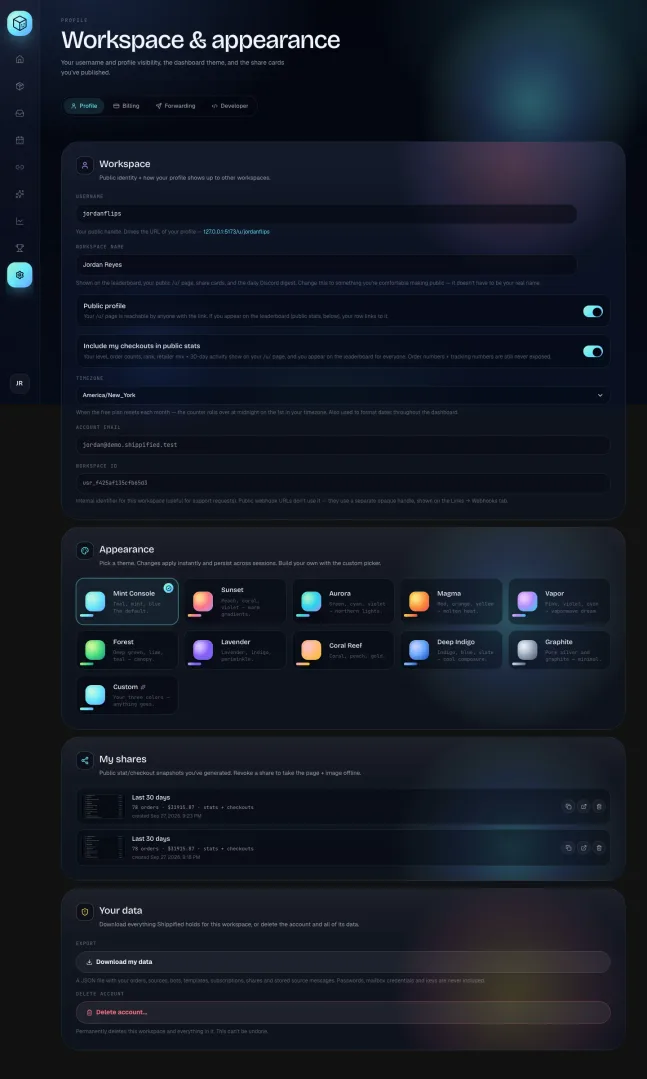
For your protection, Download my data and Delete account… only work when you're signed in to the dashboard in a browser. No API key can do either, whatever its access, so a leaked key can never export or delete your account.
Download a copy of your data
- Open Your data
Click Settings in the sidebar. You're on the Profile tab. Scroll to the bottom, to Your data.
- Click Download my data
The button shows Preparing… for a moment while Shippified gathers everything.
- Find the file
Your browser saves a file named like
shippified-export-2026-09-25.json(with today's date) to your usual downloads folder.
The file is JSON, a plain-text format that programs can read. You can open it in any text editor, or a browser, to look through it.
What's in the export
Section in the file | What it contains |
|---|---|
| When the file was made. |
| Your account details: email, workspace name, username, timezone, visibility choices, plan and subscription status, and when the account was created. |
| Your Settings choices, such as forwarding options and the default IMAP host. |
| Every order in your workspace, with all its fields: items, prices, order and tracking numbers, statuses, costs and sale prices. |
| Your connected inboxes and forwarding addresses, with their settings. |
| Your Discord monitor bots and their settings. |
| Templates you've built. |
| Recurring costs you track in the calendar. |
| Your share cards. |
| A list of your API keys: name, prefix (the first few characters), access (read-only or read & write), when each was created and last used. |
| The original messages your orders were built from: the order emails and the Discord bot posts. |
| Your activity logs: every email and Discord bot post Shippified received (the Inbox list and each bot's activity log), with what happened to it. |
| Your outbound webhook subscriptions: event types, whether each is active, the signing secret's prefix, and recent delivery status. The receiver address shows only its start, like |
| Embeds you've copied in with the Embed Copier. |
| The Discord account linked to the Embed Copier bots, if it's the one you sign in with. The saved URL shows only its start. |
What's never in the export
Working secrets are left out, so the file can't be used to break into anything:
Your password (or its scrambled form).
Sign-in, email-verification and password-reset codes.
Mailbox passwords and Google or Microsoft sign-in tokens. For each inbox, only the host, port and username (IMAP), or the email address (Gmail, Outlook) are kept.
Full API keys or any form of them. Only the name and prefix are listed.
Outbound webhook signing secrets.
Your Embed Copier submission URL secret.
The secret part of webhook URLs. Webhook addresses in your settings, bots and outbound webhook subscriptions show only the start, like
https://discord.com/…(redacted), so you can tell which is which.
The export still contains personal information: your orders, addresses from shipping emails, and the full text of your order emails. Store it somewhere safe and don't post it publicly.
If you need your orders in a spreadsheet-friendly form, a developer can also read them at any time with the Orders API.
Delete your account
Deleting your account permanently removes your workspace and everything in it, and your sign-in account too.
This can't be undone. There's no recycle bin and support can't restore a deleted account. Download your data first if you might ever want it.
Before you start
Download your data if you want a copy (see above).
If you still have a Pro subscription from before Shippified became free, you don't need to cancel it first: deleting the account cancels it with Stripe automatically. Download any receipts you want from the billing portal beforehand. See Plans and billing.
Make sure you're signed in to the dashboard in a browser.
- Open Your data
Go to Settings → Profile and scroll to Your data.
- Click Delete account…
A confirmation box opens below the button: "Type your email to confirm".
- Type your account email
Type the email address shown, exactly. Capital letters and spaces at either end don't matter; everything else must match. Until it matches, the Delete everything button stays greyed out. To back out, click Cancel.
- Click Delete everything
The button shows Deleting…. When it finishes, you're signed out and taken to the Shippified home page.
What gets deleted
All at once, as soon as you confirm:
Your account, profile and username (the username becomes free for someone else to claim).
Every order.
Connected email inboxes and forwarding addresses. Shippified stops reading your mail and forgets the stored credentials.
Discord monitor bots. Their webhook URLs stop working immediately.
Custom templates, recurring costs (subscriptions), share cards (their public pages and images go offline), and Embed Copier samples.
Activity logs and every stored order email and bot message.
API keys (anything using one stops working) and outbound webhook subscriptions.
Settings, including the daily digest, and any signed-in sessions.
If you linked Discord, the Embed Copier's saved submission link for your Discord account.
Any active Stripe subscription is cancelled, so you aren't billed again.
Your sign-in account is deleted too. Shippified sign-in runs on Atlas (at auth.shippified.net). When you delete your Shippified account, your Atlas sign-in sessions are ended and your Atlas sign-in account is deleted. To use Shippified again later you'd sign up from scratch.
Nightly database backups are kept for 14 days. Copies of your data in those backups roll off within 14 days of deletion, as described in the Privacy Policy.
If deletion fails, you'll see the reason in red under the buttons and nothing is deleted. The common one is Type your account email exactly to confirm deletion.
Choose which cookies Shippified uses
The first time you visit, a cookie banner from Cookie Munch, the service that runs Shippified's cookie choices, asks what you allow. Your choice is remembered, and Cookie Munch keeps a receipt of it.
Category | What it covers | Default |
|---|---|---|
Necessary | Things the app can't work without: keeping you signed in, your theme and layout choices, and remembering your cookie choice. | Always on |
Preferences | Shippified doesn't currently use anything in this category. Your theme and layout are covered by Necessary. | Off |
Statistics | Google Analytics: anonymous counts of which pages and features get used. | Off until you allow it |
Marketing | Meta Pixel: measures which ads lead to sign-ups. | Off until you allow it |
Nothing optional loads until you've made a choice. If you only accept Necessary, no analytics or advertising scripts run.
Change your cookie choices later
Open Cookie preferences from either place:
Signed in: click your initials at the bottom of the sidebar and choose Cookie preferences.
On the Shippified home page: scroll to the footer and click Cookie preferences in the Legal column.
The preference centre opens; change the switches and save. Statistics and Marketing stop loading from your next page view after you turn them off.
You can also clear or block cookies in your browser's privacy settings. The banner will then ask again on your next visit.
Global Privacy Control and Do Not Track
If your browser sends a Global Privacy Control signal, or the older Do Not Track setting is on, Shippified treats that as a firm "no": Statistics and Marketing stay off even if you allowed them in the banner. Some browsers and privacy extensions send Global Privacy Control for you; check your browser's privacy settings.
Make a privacy rights request
Depending on where you live (for example under GDPR in the EU and UK, or CPRA in California), you have the right to ask for a copy of your data or for it to be deleted. You can make those requests without signing in, using Shippified's privacy rights form:
The form is also linked as Your privacy rights in the cookie banner. It's hosted by Cookie Munch.
- Open the form
Use the link above, or Your privacy rights in the cookie banner.
- Choose the request
Ask for access (a copy of your data) or deletion.
- Enter the email on your account
Use the email you sign in to Shippified with. That's how your data is found.
- Follow the form's instructions
The form confirms the request and tells you how you'll get the result. Requests are answered within 30 days.
One request reaches every place Shippified keeps data about you:
Where | What it holds | A deletion request removes |
|---|---|---|
Your Shippified workspace | Your orders, inboxes, bots, templates and everything else in the app. An access request returns the same contents as Download my data. | The workspace and everything in it, the same as deleting from Settings, including cancelling any active Stripe subscription. |
Your Atlas sign-in account | Your email, password and connected sign-in methods (Discord, Google). | Your sign-in account. Atlas may apply a short waiting period before it's erased. |
Your docs profile | The profile created if you signed in to the Shippified Guides and API docs. | Your docs profile. |
If there's no account for the email you entered, the request finishes with nothing found. That's a normal answer, not an error.
If you can still sign in, Download my data and Delete account… in Settings do the same for your workspace instantly. Use the form when you can't sign in, or when you also want your docs profile covered.
You can also email support@shippified.net with any privacy question or request.
Removing individual things
You don't have to delete your whole account to remove something:
To remove | Do this |
|---|---|
An order | Open the order, then use Delete order in its editor. It stays deleted: a mailbox rebuild or a repeat of the same email won't add it back. See Order details. |
An email inbox | Remove it on Links → Email. Orders already imported from it stay. To stop it for a while instead, use Pause syncing. See Connect an email inbox. |
A Discord bot | Delete it on Links → Webhooks. Its webhook URL stops working. See Discord monitor bots. |
A share card | Revoke it in Settings → Profile → My shares. |
Your numbers from public pages | Turn off Include my checkouts in public stats in Settings → Profile. See Settings and your profile. |
An API key or outbound webhook | Revoke or delete it in Settings → Developer. See Developer tools. |
Troubleshooting
The Delete everything button stays greyed out
What you typed doesn't match your account email. Check for typos; copy the address exactly as it's shown in the box. You can see your account email in the Account email field higher up on the Profile tab.
I get "Sign in to export your data (API keys can't do this)." or "Sign in to delete your account (API keys can't do this)."
The request came from an API key, a script or an expired session. Sign in to the dashboard in your browser and use the buttons in Settings → Profile → Your data.
I see "Export failed." or "Deletion failed."
Something went wrong reaching Shippified. Check your connection, reload the page and try again. Nothing is deleted when deletion fails.
The cookie banner keeps coming back
Your browser is clearing or blocking cookies for shippified.net, so your choice can't be remembered. Allow cookies for the site, or accept that the banner will ask each visit.
I allowed Statistics, but analytics still doesn't load
Your browser is sending Global Privacy Control or Do Not Track. Shippified honours that over the banner, on purpose.